01
Units and quantities
Bill 12.5 hours, 3 days or 400 sq ft — quantity precision and unit labels are per line.
A contractor invoice template with units per line, payment terms, a signature line and a footer on every page. Edit in your browser and export a PDF, free.
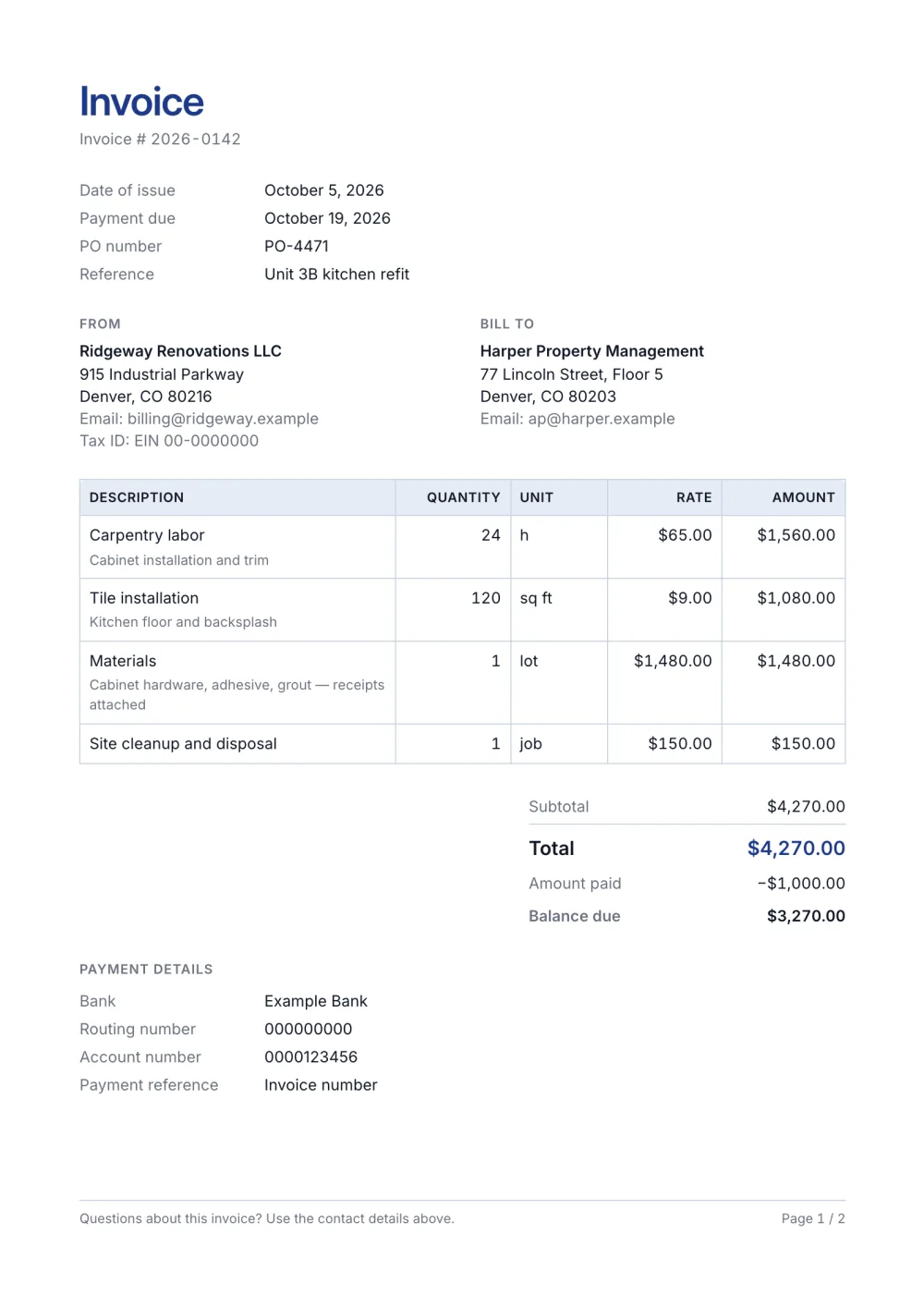
Contract work is billed in units — hours, days, square feet, visits — and often against a purchase order. This template shows the unit column, keeps a terms block for your payment conditions and ends with a signature line for acceptance.
It is built on the Contractor preset with a footer that repeats on every page, useful when the items table runs long.
Fictional details, real layout — this is the document the template produces. Open it in the editor to change anything, or print it to see the PDF.
| Description | Quantity | Rate | Amount |
|---|---|---|---|
| Carpentry laborCabinet installation and trim24 h × $65.00 | $1,560.00 | ||
| Tile installationKitchen floor and backsplash120 sq ft × $9.00 | $1,080.00 | ||
| MaterialsCabinet hardware, adhesive, grout — receipts attached1 lot × $1,480.00 | $1,480.00 | ||
| Site cleanup and disposal1 job × $150.00 | $150.00 | ||
| Total | $4,270.00 | ||
| Amount paid | $1,000.00 | ||
| Balance due | $3,270.00 | ||
Open the template. Click “Use this template” and the editor opens in your browser with this layout. There is nothing to install and no account to create.
Add your details and your client’s. Your name or business, address and tax ID go under From; your client’s go under Bill To.
List what you are charging for. One line per service or product, with a quantity and a rate. Amounts, tax and the total update as you type.
Check the number, dates and payment details. Every invoice needs a unique number and an issue date; add the due date and the bank details you want to be paid to.
Export the PDF and send it. Choose Export → Save as PDF, save the file from the print dialog and attach it to your email.
01
Bill 12.5 hours, 3 days or 400 sq ft — quantity precision and unit labels are per line.
02
Your due period, retention and late-fee wording sit on the invoice itself, not in an email that gets lost.
03
Long item lists paginate cleanly with a repeated table header and page numbers in the footer.
It bills units — hours, square feet, visits — often against a purchase order, and it usually lists materials separately from labor. This template has a unit column, a PO field, a terms block and a signature line so the client can accept the work on the same document.
Enter the deposit you already received as the amount paid; the totals show it and the balance due. If you bill in stages, send one invoice per stage and reference the job in each.
Yes — it lets the client check the bill against receipts and makes any markup clear. Put materials on their own line, or one line per category, and note that receipts are attached.
Yes. The template, the editor and the PDF export are free, with no account and no sign-up. Your invoice is saved in your browser and never uploaded.
As a PDF: fill it in online, choose Export → Save as PDF and save the file from the print dialog. It is not a Word or Excel file, so there are no formulas to break — the totals and tax are calculated for you. You can also copy a share link that reopens the invoice, or keep a JSON copy.
Yes. Switch blocks on or off, reorder them, change the accent colour, the labels, the paper size and the number and date formats — or switch to another template at any time without retyping your content.
It opens straight in Generate — start from this layout and send it today.