01
VAT on every line
A dedicated tax column keeps the rate visible beside each taxable item.
A VAT invoice template with supplier and customer VAT IDs, place of issue, per-line VAT and a complete tax breakdown. Edit online and export PDF.
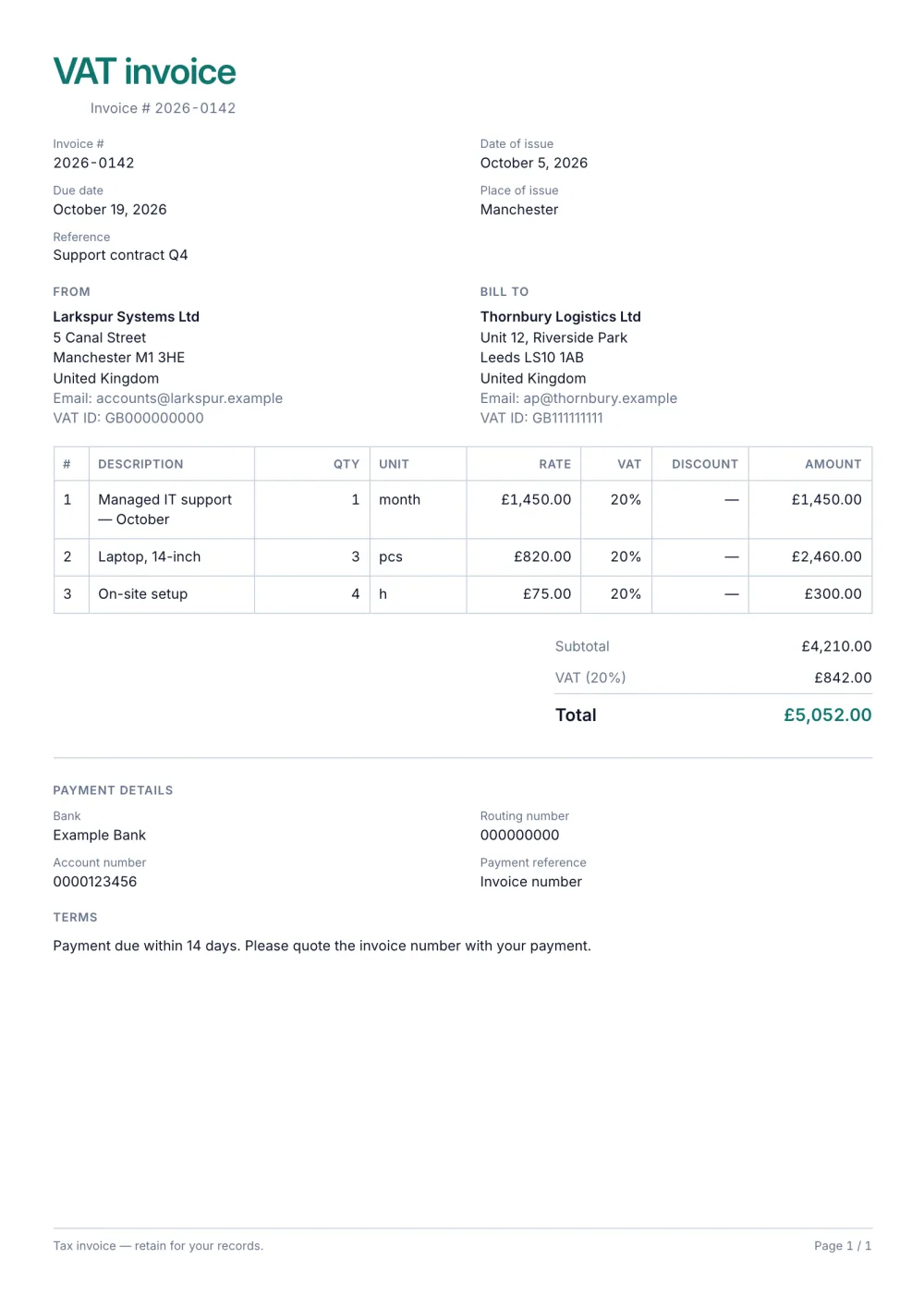
The VAT preset is designed for invoices where tax detail cannot be an afterthought. It records place of issue and reference, shows both parties' tax IDs and adds VAT to every relevant line.
Its compact A4 grid fits item numbers, units, quantity, rate, VAT, discount and amount. The totals then show subtotal, discount, tax, amount paid and amount payable.
Fictional details, real layout — this is the document the template produces. Open it in the editor to change anything, or print it to see the PDF.
| Description | Qty | Rate | Amount |
|---|---|---|---|
| Managed IT support — October1 month × £1,450.00 | £1,450.00 | ||
| Laptop, 14-inch3 pcs × £820.00 | £2,460.00 | ||
| On-site setup4 h × £75.00 | £300.00 | ||
| Subtotal | £4,210.00 | ||
| VAT 20% | £842.00 | ||
| Total | £5,052.00 | ||
Open the template. Click “Use this template” and the editor opens in your browser with this layout. There is nothing to install and no account to create.
Add your details and your client’s. Your name or business, address and tax ID go under From; your client’s go under Bill To.
List what you are charging for. One line per service or product, with a quantity and a rate. Amounts, tax and the total update as you type.
Check the number, dates and payment details. Every invoice needs a unique number and an issue date; add the due date and the bank details you want to be paid to.
Export the PDF and send it. Choose Export → Save as PDF, save the file from the print dialog and attach it to your email.
01
A dedicated tax column keeps the rate visible beside each taxable item.
02
Tax IDs, place of issue, reference and breakdown are present in one compact document.
03
Show discounts, amount already paid and the remaining amount payable in the totals.
It is issued by a VAT-registered business and shows what the tax authority requires — typically both parties' details, your VAT number, a unique number, the date of supply, the net amounts, the VAT rate and the VAT amount. The exact list depends on the country; VAT and sales tax on invoices explains the basics.
Not on the same invoice yet: each tax row applies to every taxable line. Lines without tax can be marked as not taxable; if you sell at two different rates, issue one invoice per rate, or check with your accountant how to show it.
Choose the reverse-charge, exempt or zero-rated kind for the tax row and add the legal wording in its note; it prints on the invoice instead of a tax amount. Check the wording your tax authority requires.
Yes. The template, the editor and the PDF export are free, with no account and no sign-up. Your invoice is saved in your browser and never uploaded.
As a PDF: fill it in online, choose Export → Save as PDF and save the file from the print dialog. It is not a Word or Excel file, so there are no formulas to break — the totals and tax are calculated for you. You can also copy a share link that reopens the invoice, or keep a JSON copy.
Yes. Switch blocks on or off, reorder them, change the accent colour, the labels, the paper size and the number and date formats — or switch to another template at any time without retyping your content.
It opens straight in Generate — start from this layout and send it today.