01
Hours, not guesses
Each line is a quantity of hours times your rate, so the client can check every amount against the timesheet.
An hourly invoice template listing dates worked, hours and rate per line in a timesheet-style table. Edit in your browser and export a PDF — free.
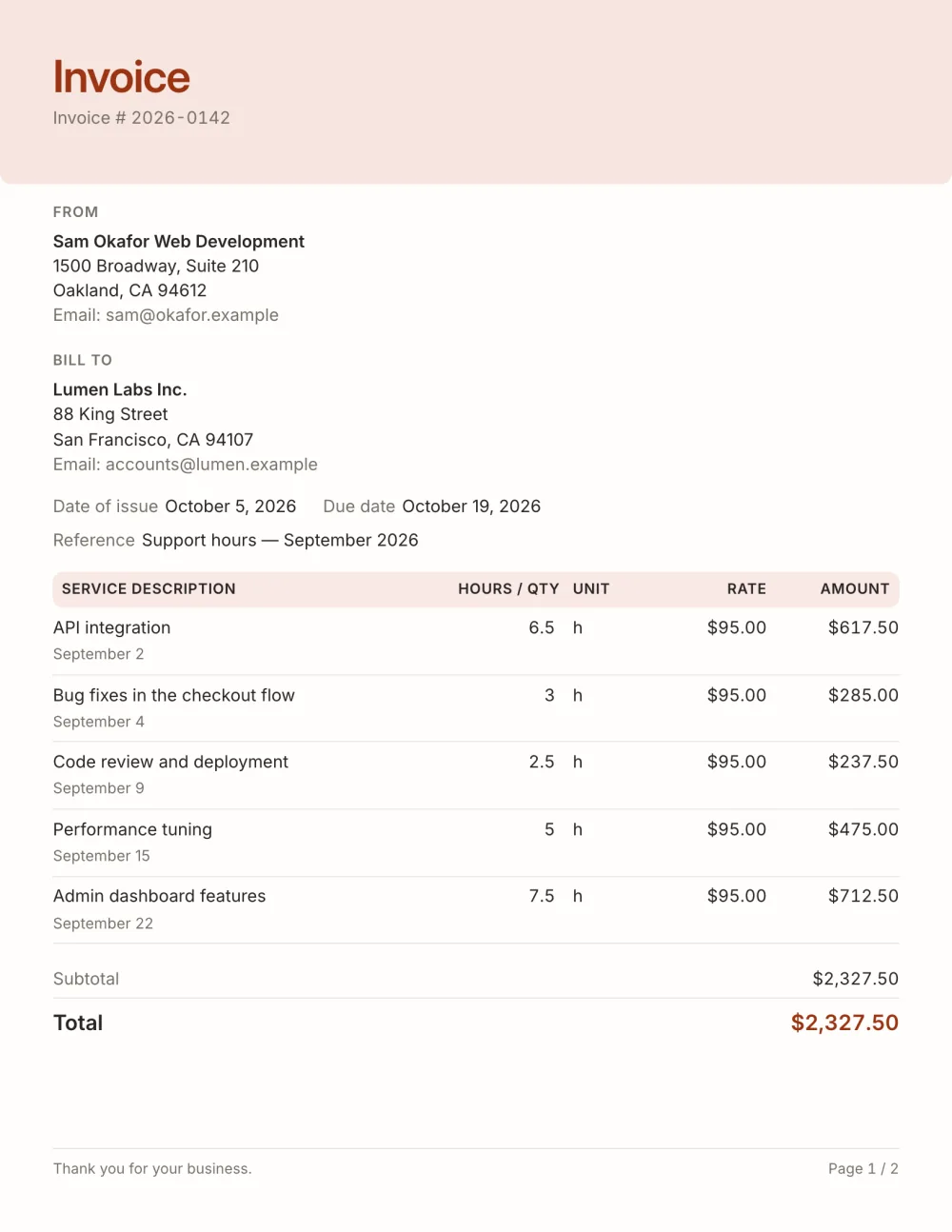
Hourly billing produces many short lines: a date, a task, a number of hours. This template uses the Service preset — an hours column next to a unit column, a details line under each task and a tinted header — so a month of entries stays easy to check.
Quantities accept decimals (7.5 hours) and the unit column reads "h" or whatever you prefer.
Fictional details, real layout — this is the document the template produces. Open it in the editor to change anything, or print it to see the PDF.
| Service description | Hours / qty | Rate | Amount |
|---|---|---|---|
| API integrationSeptember 26.5 h × $95.00 | $617.50 | ||
| Bug fixes in the checkout flowSeptember 43 h × $95.00 | $285.00 | ||
| Code review and deploymentSeptember 92.5 h × $95.00 | $237.50 | ||
| Performance tuningSeptember 155 h × $95.00 | $475.00 | ||
| Admin dashboard featuresSeptember 227.5 h × $95.00 | $712.50 | ||
| Total | $2,327.50 | ||
Open the template. Click “Use this template” and the editor opens in your browser with this layout. There is nothing to install and no account to create.
Add your details and your client’s. Your name or business, address and tax ID go under From; your client’s go under Bill To.
List what you are charging for. One line per service or product, with a quantity and a rate. Amounts, tax and the total update as you type.
Check the number, dates and payment details. Every invoice needs a unique number and an issue date; add the due date and the bank details you want to be paid to.
Export the PDF and send it. Choose Export → Save as PDF, save the file from the print dialog and attach it to your email.
01
Each line is a quantity of hours times your rate, so the client can check every amount against the timesheet.
02
Quantity precision is automatic — 1.25 shows as 1.25, 8 shows as 8.
03
When a timesheet runs over, the next page starts with the column headings again.
Multiply the hours on each line by your hourly rate; the template does it per line and adds the lines up. Quantities accept decimals, so 7.5 or 1.25 hours print exactly.
Use whatever increment you agreed with the client — quarter hours and tenths of an hour are common. Round the same way every time and say so in the notes if the client might ask.
Not always, but it prevents questions. Either list each day as its own line, as in the example, or bill the total hours on one line and attach the timesheet as a separate file.
Yes. The template, the editor and the PDF export are free, with no account and no sign-up. Your invoice is saved in your browser and never uploaded.
As a PDF: fill it in online, choose Export → Save as PDF and save the file from the print dialog. It is not a Word or Excel file, so there are no formulas to break — the totals and tax are calculated for you. You can also copy a share link that reopens the invoice, or keep a JSON copy.
Yes. Switch blocks on or off, reorder them, change the accent colour, the labels, the paper size and the number and date formats — or switch to another template at any time without retyping your content.
It opens straight in Generate — start from this layout and send it today.