01
Licensing on the invoice
State the usage, territory and duration in the terms block, so the licence and the payment are in one document.
A photography invoice template with shoot, editing and licence lines, a deposit and usage terms in writing. Edit in your browser and export a free PDF.
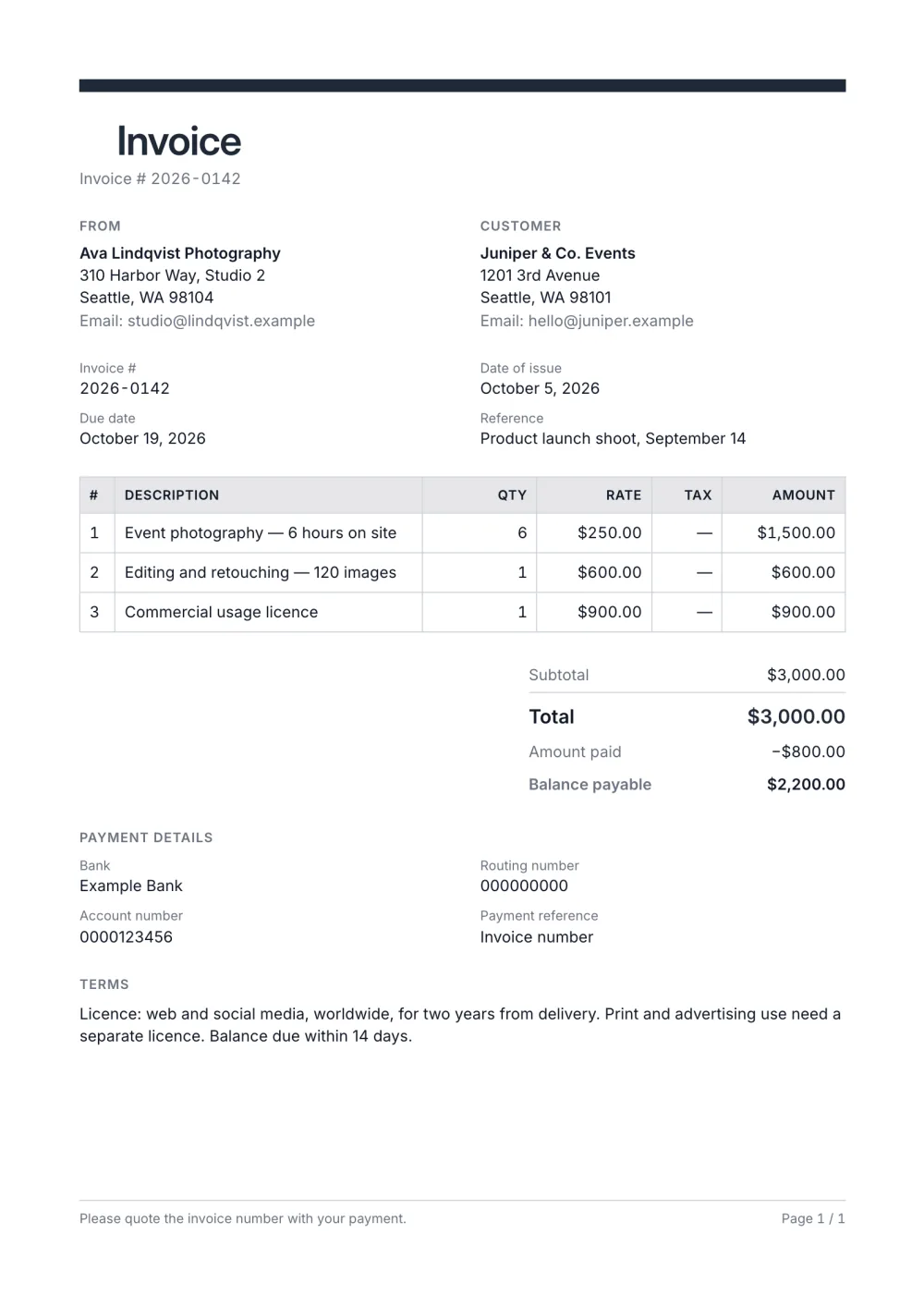
A photography invoice usually separates the shoot fee, post-production and licensing, and needs the usage rights in writing. This template numbers every line, keeps a terms block under the payment details for the licence wording and uses the Professional preset — a dark accent bar and a grid table — so the document looks as considered as the work.
Deposits are common in this trade; the totals block shows the amount already paid and the balance payable.
Fictional details, real layout — this is the document the template produces. Open it in the editor to change anything, or print it to see the PDF.
| Description | Qty | Rate | Amount |
|---|---|---|---|
| Event photography — 6 hours on site6 × $250.00 | $1,500.00 | ||
| Editing and retouching — 120 images1 × $600.00 | $600.00 | ||
| Commercial usage licence1 × $900.00 | $900.00 | ||
| Total | $3,000.00 | ||
| Amount paid | $800.00 | ||
| Balance payable | $2,200.00 | ||
Open the template. Click “Use this template” and the editor opens in your browser with this layout. There is nothing to install and no account to create.
Add your details and your client’s. Your name or business, address and tax ID go under From; your client’s go under Bill To.
List what you are charging for. One line per service or product, with a quantity and a rate. Amounts, tax and the total update as you type.
Check the number, dates and payment details. Every invoice needs a unique number and an issue date; add the due date and the bank details you want to be paid to.
Export the PDF and send it. Choose Export → Save as PDF, save the file from the print dialog and attach it to your email.
01
State the usage, territory and duration in the terms block, so the licence and the payment are in one document.
02
Enter the retainer as amount paid; the balance payable is calculated and emphasised.
03
Set the accent to your brand colour and add your logo; the header bar and table heading follow.
Give the licence its own line with its own fee, and spell out the usage — where the images may appear, in which territory and for how long — in the terms block. The invoice then doubles as a record of what the client bought.
Enter the deposit as the amount paid. The totals show the full fee, the deposit already received and the balance payable, so the final invoice settles the booking in one document.
Usually, yes. Separating the shoot, the editing and the licence makes the price easier to understand and to negotiate, and it lets you reuse the same lines for the next booking.
Yes. The template, the editor and the PDF export are free, with no account and no sign-up. Your invoice is saved in your browser and never uploaded.
As a PDF: fill it in online, choose Export → Save as PDF and save the file from the print dialog. It is not a Word or Excel file, so there are no formulas to break — the totals and tax are calculated for you. You can also copy a share link that reopens the invoice, or keep a JSON copy.
Yes. Switch blocks on or off, reorder them, change the accent colour, the labels, the paper size and the number and date formats — or switch to another template at any time without retyping your content.
It opens straight in Generate — start from this layout and send it today.