01
Your colour, everywhere
The accent drives the top bar, table header and total. Enter a hex value for an exact brand match.
A design invoice template with your accent colour, a clean type scale and a numbered line for each project phase. Edit in your browser, export a free PDF.
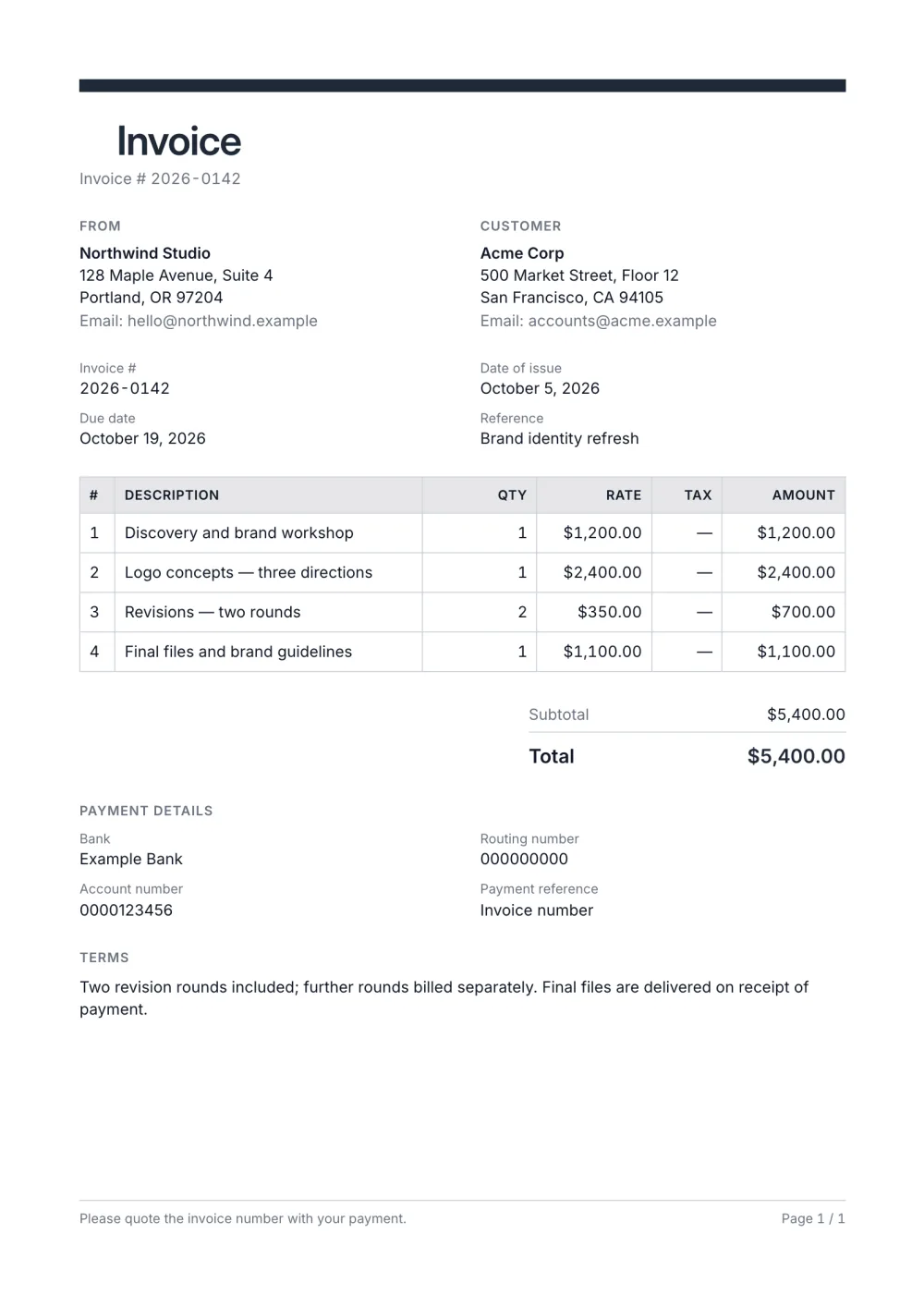
Designers are judged on their paperwork too. This template starts from the Professional preset and leans on a single accent colour, a thick bar across the top and a numbered grid table — a document that looks designed without shouting.
Line items map naturally to project phases — discovery, concepts, revisions, final files — and the terms block holds your revision and payment policy.
Fictional details, real layout — this is the document the template produces. Open it in the editor to change anything, or print it to see the PDF.
| Description | Qty | Rate | Amount |
|---|---|---|---|
| Discovery and brand workshop1 × $1,200.00 | $1,200.00 | ||
| Logo concepts — three directions1 × $2,400.00 | $2,400.00 | ||
| Revisions — two rounds2 × $350.00 | $700.00 | ||
| Final files and brand guidelines1 × $1,100.00 | $1,100.00 | ||
| Total | $5,400.00 | ||
Open the template. Click “Use this template” and the editor opens in your browser with this layout. There is nothing to install and no account to create.
Add your details and your client’s. Your name or business, address and tax ID go under From; your client’s go under Bill To.
List what you are charging for. One line per service or product, with a quantity and a rate. Amounts, tax and the total update as you type.
Check the number, dates and payment details. Every invoice needs a unique number and an issue date; add the due date and the bank details you want to be paid to.
Export the PDF and send it. Choose Export → Save as PDF, save the file from the print dialog and attach it to your email.
01
The accent drives the top bar, table header and total. Enter a hex value for an exact brand match.
02
One numbered line per phase lets the client see the scope and the price of each step without a separate document.
03
Revision rounds, file handover and payment terms sit in the terms block, where they are read before the payment.
By phase or by deliverable — discovery, concepts, revisions, final files — with one line each. It shows the client what each step cost and makes extra rounds easy to add as their own line.
State how many rounds the fee includes in the terms, then bill any extra round as a separate line with a quantity and a rate. Clients accept extra charges more easily when the limit was on the paperwork from the start.
Many do — often a share of the fee before work starts. Enter it as the amount paid on the final invoice and the balance is calculated for you. Invoice payment terms explained covers deposits and due dates.
Yes. The template, the editor and the PDF export are free, with no account and no sign-up. Your invoice is saved in your browser and never uploaded.
As a PDF: fill it in online, choose Export → Save as PDF and save the file from the print dialog. It is not a Word or Excel file, so there are no formulas to break — the totals and tax are calculated for you. You can also copy a share link that reopens the invoice, or keep a JSON copy.
Yes. Switch blocks on or off, reorder them, change the accent colour, the labels, the paper size and the number and date formats — or switch to another template at any time without retyping your content.
It opens straight in Generate — start from this layout and send it today.